Digital LED mono/RGB staircase-corridor controller 12-24V Twilight sensor and 2xPIR

Kategorie: LED control \ LED switches
Ceny
Ceny i stany dostępne po zalogowaniu
Dane
Symbol
ID-2601
Kod kreskowy
5901874279941
JednostkaPodstawowa
szt.
Protection class:
With motion sensor:
Power supply:
Opis

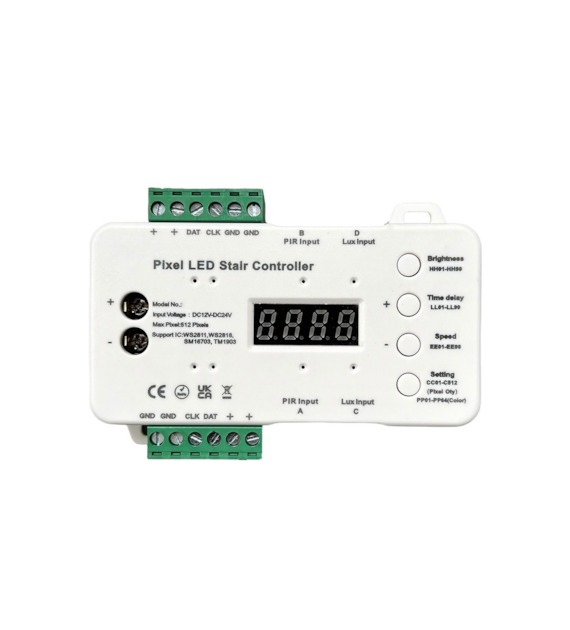
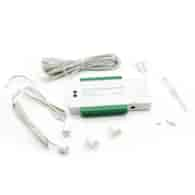
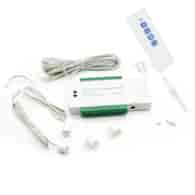
Digital stairway-corridor controller LED MONO/RGB dusk and PIR sensor

Voltage:
12V -24V DC

Maximum number of pixels:
512

Maximum current:
10A

Compatible with IC:
WS2811, WS2818, SM16703, TM1903

Type of strip:
digital mono or RGB

Operating temperature:
max. 45°C

Motion sensor:
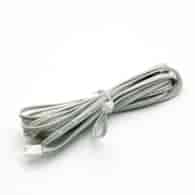
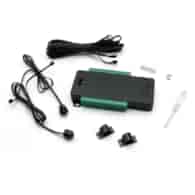
YES (2 pieces on a 100cm wire + 500cm extension)

Motion sensor range:
1.5-2m

Wide motion detection angle:
approx 130°

Twilight sensor:
YES (7 levels)

Speed adjustment:
YES

Time adjustment:
YES

Brightness adjustment:
YES

IP degree:
IP20

Connection method:
terminal blocks tightened with screws
screwdriver included

External dimensions:
105 x 55 x 22mm

Warranty:
2 years

Certificates:
CE, RoHS

PIR sensors react to motion at the top or bottom of the stairs; upon detecting motion, the lighting gradually turns on. This occurs from the first to the last step, from the side of the sensor that detected the motion.
The user can turn the dusk sensor on or off, as well as set the desired light intensity using the regulator.

Instruction

Daylight sensor

The daylight sensor does not need to be placed in a visible location near the stairs, but it should allow for light and dusk detection.
The sensor has 7 indicator LEDs. When the sensor is turned off by the button (the "OFF" indicator will light up blue), the lighting will be on both during the day and in the evening.
Pressing the button again will turn the sensor on at the desired setting.
Setting modes

  • 1× Press— the sensor is off
  • 2× Press— 5 Lux (will turn on when it is completely dark)
  • 3× Press— 15 lux
  • 4× Press— 30 lux
  • 5× Press— 50 lux
  • 6× Press— 100 lux
  • 7× Press— 150 lux (will turn on when it is bright)

Brightness

Brightness has 99 levels; a short press increases brightness by 1 level.
Digital display:HHO1 – HH99

  • HHO1— 2% brightness
  • HHO2— 3% brightness
  • HHO3— 4% brightness
  • ...
  • HH99— 100% brightness

Use the “+” and “-” buttons to adjust brightness.

Time delay

The time delay has 99 levels. Press briefly to add 1 level.
Digital display:LL01 – LL99

  • LL01— 4 s
  • LL02— 6 s
  • LL03— 8 s
  • ...
  • LL99— 200 s

Use the “+” and “-” buttons to adjust the time delay.

Speed

Speed has 99 levels. A short press adjusts the speed.
Digital display:EE01 – EE99

  • EE01— fastest speed 150 ms
  • EE02— 175 ms
  • EE03— 200 ms
  • ...
  • EE99— 2600 ms (slowest speed)

Use the “+” and “-” buttons to adjust the speed. Remember that “EE01” is the highest speed and “EE99” is the lowest. If you wantto increasethe speed, press “-”. If you wantto decreasethe speed, press “+”.

Number of pixels

Set the number of pixels based on the bar.

  • CC01— 1 pixel
  • C512— 512 pixels

Use the “+” and “-” buttons to adjust the number of pixels.

RGB and MONO

  • If you are connecting a single-color LED pixel strip to the controller, chooseCH-1.
  • If you are connecting an RGB LED pixel strip to the controller, chooseCH-3.

Change the sequence of the RGB digital LED strip.

  • LO-1— R G B
  • LO-2— R B G
  • LO-3— G R B
  • LO-4— B R G
  • LO-5— G B R
  • LO-6— G B R

Color

If you are connecting an RGB Pixel LED strip, you can choose the color of the strip.

  • PP01— first color
  • PP64— last color

Use the “+” and “-” buttons to select the color.

Setting

Press and hold “Setting” to adjust brightness, delay, speed, RGB or single color, number of pixels, and color.
Press “Setting” briefly to go to the next setting. After completing all settings, press and hold “Setting” to save all settings.
Dołożyliśmy wszelkich starań, aby powyższe dane były poprawne, jednak nie gwarantujemy, że publikowane informacje nie zawierają błędów, które nie mogą jednak stanowić podstawy do jakichkolwiek roszczeń.
© SolEx B2B